jsmn-tools
Transform OpenAPI schemas into zero-allocation C code that can parse and serialize JSON — powered by jsmn.
Install
$ uv add jsmn-tools
$ pip install jsmn-tools
Verify the install:
$ jsmn --help
Define a Schema
Create an OpenAPI spec with the x-jsmn-type extension on any schema you want
to generate code for.
openapi: "3.1.0"
info:
  title: Sensor API
  version: "0.1.0"
components:
  schemas:
    sensor_reading:
      type: object
      x-jsmn-type: sensor_reading
      required: [id, temperature, label]
      properties:
        id:
          type: integer
          format: uint32
        temperature:
          type: number
          format: float
        label:
          type: string
          maxLength: 16
The x-jsmn-type extension tells jsmn-tools to generate a C struct and
encode/decode functions for this schema. Without it, the schema is ignored.
Add to Your Project
jsmn-tools provides various ways to integrate with your C project. You can use CMake, Meson, or integrate to your build system of choice using the CLI tool directly.
Generate the files directly, then compile with any toolchain.
$ jsmn generate sensor.yaml --out-dir src/ --name sensor
$ cc -Os -DJT_HAS_FLOAT -o main main.c src/sensor.c -Isrc/
Re-run jsmn generate whenever the spec changes. -DJT_HAS_FLOAT opts the
runtime into float parsing (required because temperature is a float).
cmake_minimum_required(VERSION 3.20)
project(sensor C)

# Discover jsmn-tools CMake module
execute_process(
    COMMAND jsmn cmake-dir
    OUTPUT_VARIABLE JSMN_CMAKE_DIR
    OUTPUT_STRIP_TRAILING_WHITESPACE)
find_package(JsmnTools REQUIRED CONFIG HINTS ${JSMN_CMAKE_DIR})

# Generate codec sources from spec (writes jsmn.h, sensor.h, sensor.c)
jsmn_generate(sensor_codegen
    SPECS  sensor.yaml
    NAME   sensor
    OUTDIR ${CMAKE_CURRENT_BINARY_DIR})

# Compile the generated .c directly into the executable. Listing it as a
# source auto-wires the codegen ordering — no add_dependencies() needed.
add_executable(main
    main.c
    ${CMAKE_CURRENT_BINARY_DIR}/sensor.c)
target_include_directories(main PRIVATE ${CMAKE_CURRENT_BINARY_DIR})
target_compile_definitions(main PRIVATE JT_HAS_FLOAT)
target_compile_options(main PRIVATE -Os)
$ cmake -B build && cmake --build build
Use a custom_target to run code generation, then depend on the outputs.
project('sensor', 'c')

jsmn = find_program('jsmn')

sensor_gen = custom_target('sensor_codegen',
    command: [jsmn, 'generate', '@INPUT@',
             '--out-dir', '@OUTDIR@',
             '--name', 'sensor'],
    input: 'sensor.yaml',
    output: ['jsmn.h', 'sensor.h', 'sensor.c'],
)

executable('main', 'main.c', sensor_gen,
    c_args: ['-Os', '-DJT_HAS_FLOAT'])
$ meson setup build && meson compile -C build
Use the Generated Code
#include <stdio.h>
#include <string.h>
#include "sensor.h"

int main(void) {
    /* Encode a struct to JSON */
    struct sensor_reading reading = {
        .id = 42,
        .temperature = 23.5f,
        .label = "ambient",
    };

    uint8_t buf[256];
    int32_t n = jsmn_encode_sensor_reading(buf, sizeof(buf), &reading);
    printf("JSON: %.*s\n", n, buf);

    /* Decode JSON back to a struct */
    const char *json = "{\"id\":7,\"temperature\":18.2,\"label\":\"inlet\"}";
    struct sensor_reading decoded;
    int32_t ret = jsmn_decode_sensor_reading(
        &decoded, json, strlen(json));
    printf("id=%u temp=%.1f label=%s\n",
           decoded.id, decoded.temperature, decoded.label);

    return 0;
}
No heap allocation. No dependencies beyond the generated files.
How It Works
At the heart of jsmn-tools is the “render pipeline” which intelligently walks
your OpenAPI and AsyncAPI specifications, where no jsonschema goes unfound. Any
schema that is marked with the jsmn-tools extension x-jsmn-type will be
recognized as an input to the code generation renderer.
openapi: "3.1.0"
info:
    title: Demonstration
    version: 2
components:
    schemas:
        user:
            type: object
            x-jsmn-type: user
            required:
                - name
                - password
            properties:
                name:
                    type: string
                    maxLength: 32
                password:
                    type: string
                    maxLength: 32
struct user {
    uint8_t name[32];
    uint8_t password[32];
};

int32_t jsmn_decode_user(
    struct user *dst,
    const char *src,
    uint32_t slen);

int32_t jsmn_encode_user(
    uint8_t *dst,
    uint32_t dlen,
    const struct user *src);
The x-jsmn-type extension is intended to be declared on any complex types such
as Objects, Arrays, and Strings. Valid candidates for code generation must be
bounded. For example, any arrays must have maxItems declared in the schema, and
any strings must have maxLength declared in the schema, so that the generated
code knows the size of the type.
Note
Remember, jsmn-tools is intended for environments without an allocator!
Pipeline
OpenAPI and AsyncAPI schemas enter into the preprocessing layer, building
Intermediate Representation (IR) optimized for code rendering. The IR is passed
to the Jinja environment, where the jsmn-tools templates are rendered into
source files for your project.
        flowchart LR
    A[OpenAPI / AsyncAPI] --> B[Preprocess]
    B --> C[IR]
    C --> D[Jinja]
    D --> E[C sources]
During the preprocessing pipeline, a prefixing step tells the code generator
that the x-jsmn-type entering the pipeline is namespaced. The generator then
follows these conventions when naming generated types and functions.
Input
x-jsmn-type: sensor
Output
struct sensor;
jsmn_encode_sensor(...);
jsmn_decode_sensor(...);
Input
x-jsmn-type: sensor
x-jsmn-prefix: foo_
Output
struct foo_sensor;
foo_encode_sensor(...);
foo_decode_sensor(...);
Input
x-jsmn-type: foo_sensor
Output
struct foo_sensor;
jsmn_encode_foo_sensor(...);
jsmn_decode_foo_sensor(...);
Note
The --prefix CLI flag applies the prefix automatically to every
x-jsmn-type in the specifications, so you don’t need to stamp
x-jsmn-prefix by hand on each schema.
When the pipeline is finished, the rendered templates produce compile ready source code. The (2) primary components of the rendered output files is the runtime and the descriptor tables.
Runtime
The runtime provides a polymorphic interface that supports all of the
x-jsmn-type declarations found when processing the schemas. The runtime is a
one-time ~7.5KiB cost (measured on x86 with -Os). A configurable “shim
layer” provides a type-safe, ergonomic API and leverages the shared runtime
algorithms for encode and decode routines.
        flowchart LR
    T["`**schema**
    - openapi: 3.1.0
    - x-jsmn-type: sensor`"] --> S["`**shim layer**
    - jsmn_encode_sensor
    - jsmn_decode_sensor`"] --> R["`**shared**
    - jsmn_encode
    - jsmn_decode`"]
By sharing the encode and decode algorithms across all types, the system beats a hand-rolled alternative, where iterating tokens at the call sites would be prohibitive on constrained embedded systems. Each additional type adds ~155 bytes, depending on the number of properties and size of the property keys for each type.
We can see below how the system scales from 1 x-jsmn-type (~7.5KiB), to 100
x-jsmn-types (~22.8KiB) to 500 x-jsmn-types (~84.8KiB), using a sample
object with 4 properties. The chart demonstrates the contribution of the
descriptor tables and the “shim layer”, which can be configured to use static inline shims or extern declarations. The “extern” declarations are useful if
you need to export the API as a library, at the cost of losing cross-boundary
inlining.
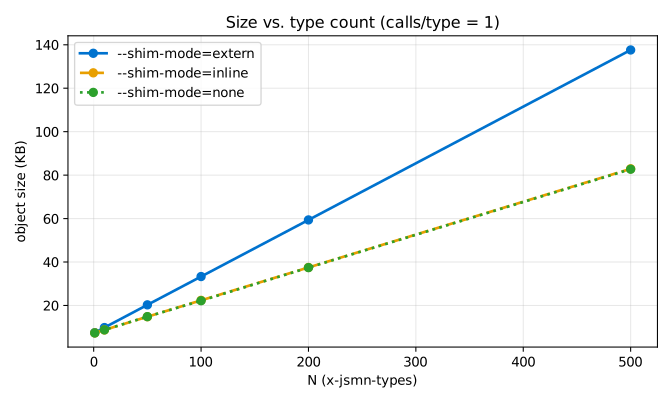
The shim knobs are granular per type. You can keep the default of static inline shims, and elect to export a few symbols with extern declarations
and provide a public-facing API for selected types.
Descriptor Tables
Every x-jsmn-type contributes entries to four descriptor tables. An
object table and an array table describe each composite type —
what it contains, and where to find each member inside the C struct —
and steer the runtime through encode and decode. A field table lists
every declared property, and a string table provides an indexable
pool of property names, shared across objects: when multiple types
declare the same name, it is stored once.
A compact type handle identifies what the runtime is currently looking at — a primitive, an entry in the object table, or an entry in the array table. The runtime treats this handle as its only input; the tables supply everything else.
Each descriptor row is exactly 8 bytes with no pointers, so the entire
block is read-only and ships in .rodata. Adding or removing schemas
grows or shrinks the tables; the runtime itself never changes.
Custom Rendering
By default, the system will export a source file and a header file that assumes the header file is located adjacent to the source file. But JsmnTools ships templates that can be patterned into your source code however way you choose.
Amalgamated (single source file)
With custom rendering, you can also choose to amalgamate the entire runtime, descriptor tables and shims into a single source file — useful when you want one translation unit with no headers to ship and nothing to link.
See examples/amalgamate/
for that variant.
Plugin
The plugin system lets you programmatically select schemas based on environment variables passed from the CLI, and extend the Jinja environment directly with your own globals, filters, and tests — typical of a normal Jinja environment.
See examples/plugin/
for the minimal shape. It renders a Markdown type catalog rather than C,
incidentally demonstrating that jsmn render is not C-specific — any text
output format works.
Plugin
A Jsmn Tools Plugin is a Python module loaded via jsmn render --plugin PATH
(or --plugin DIR where DIR contains a .jsmn-tools.py). It extends the
renderer past what command-line arguments can express: programmatic spec
discovery, custom Jinja filters and globals, and a jsmn bundle entry
point. The CLI calls up to three top-level hooks, each at a specific
point in the render pipeline.
collect(env)
Jsmn Tools leverages the
referencing library
for intra-doc $ref resolution, and exposes this interface directly
to the plugin layer. Plugin authors contribute to the specification
Registry
via the collect hook by returning a list of
Resource
objects. Anything returned here is merged with specs passed on the
command line, not replaced by them.
Typical uses:
Glob a directory of specs
Fetch specs from a URL or artifact registry
Generate specs inline from code
from pathlib import Path
from jsmn_tools.plugin.loader import load_resource

HERE = Path(__file__).parent

def collect(env):
    return [load_resource(p) for p in sorted((HERE / "specs").glob("*.yaml"))]
bundle(env)
Called by jsmn bundle to produce a single merged spec on disk. Most
plugins already implement collect, so bundle is usually a one-line
wrapper around load_bundle() of the collected resources:
from jsmn_tools.plugin.loader import load_bundle

def bundle(env):
    return load_bundle(*[r.contents for r in collect(env)])
jinja(env)
The (optional) jinja hook lets plugin authors extend the Jinja
Environment with custom filters, tests, and globals — so templates
have the full capabilities expected of a normal Jinja environment.
from jinja2 import Environment

def jinja(env):
    e = Environment(
        keep_trailing_newline=True,
        trim_blocks=True,
        lstrip_blocks=True,
    )
    e.filters["banner"] = lambda s: f"<!-- {'=' * 8} {s} {'=' * 8} -->"
    e.tests["is_public_api"] = lambda d: d.ctype.name.startswith("pub_")
    e.globals["project_name"] = env.get("project_name", "untitled")
    return e
Plugin Configuration
The env dict passed to each hook is assembled from --env KEY=VALUE
CLI flags. It’s the escape hatch for parameterizing a plugin at
invocation time — file paths, feature toggles, build metadata — without
changing the plugin source.
$ jsmn render --plugin . --env project_name=sensor-kit --env build=release ...
Zephyr integration
Jsmn Tools provides helpful methods under jsmn_tools.plugin.zephyr
for Zephyr workspaces. These extend the plugin env with selected
Kconfig parameters from the build’s autoconf.h, and discover
schemas contributed by supporting
west
modules across the workspace. A plugin can then select schemas
programmatically based on build configuration, and reference schemas in a
multi-module project with a conventional syntax instead of hard coding paths.
Bundle
Reference
CLI
Jsmn Tools installs a single jsmn executable exposing four subcommands.
jsmn --help lists them; jsmn <sub> --help prints per-subcommand usage.
jsmn cmake-dir
Prints the path to Jsmn Tools’ CMake module directory. Consumer projects
use it to locate JsmnToolsConfig.cmake ahead of find_package.
$ jsmn cmake-dir
/usr/local/lib/python3.X/site-packages/jsmn_tools/cmake/modules
See examples/cmake/CMakeLists.txt for typical usage.
jsmn bundle
Joins the components/schemas sections of one or more OpenAPI / AsyncAPI
specs into a single merged spec on disk. Useful for downstream tooling
that expects a single file (e.g., Redocly, Stoplight, openapi-generator).
$ jsmn bundle [SPECS...] --out-dir DIR [--plugin PATH] [--env K=V]...
Argument |
Description |
|---|---|
|
Zero or more YAML spec files. |
|
Required. Directory that receives |
|
Plugin module or directory; its |
|
Config entry passed to the plugin. Repeatable. |
jsmn render
Renders user-supplied Jinja templates against the loaded specs. The
primary escape hatch — full control over output layout and contents. All
custom-rendering examples (examples/amalgamate, examples/shared_runtime,
examples/plugin) drive this command.
$ jsmn render [SPECS...]
              --template TPL OUT [--template TPL OUT]...
              [--plugin PATH]
              [--prefix PREFIX]
              [--shim-mode {extern,inline,none}]
              [--env K=V]... [--global K=V]...
Argument |
Description |
|---|---|
|
Zero or more YAML spec files. Merged with any plugin-provided specs. |
|
Template file and its output path. Repeatable. |
|
Plugin module or directory. See Plugin. |
|
Function / type-name prefix applied across all |
|
Default typed-shim emission: |
|
Config entry passed to the plugin. Repeatable. |
|
Jinja template global. Repeatable. |
jsmn generate
Thin wrapper around render that emits the standard trio — jsmn.h,
<NAME>.h, <NAME>.c — into an output directory. For projects that
don’t need custom rendering.
$ jsmn generate [SPECS...]
                --name NAME --out-dir DIR
                [--plugin PATH]
                [--prefix PREFIX]
                [--shim-mode {extern,inline,none}]
                [--env K=V]... [--global K=V]...
Argument |
Description |
|---|---|
|
Required. Base name for the emitted |
|
Required. Directory that receives generated files. |
others |
Same semantics as |